Sunday, December 9, 2018


ONLINE MODULE #5

COLLABORATION TOOLS & COMMUNICATION TOOLS

BLOGSPOT

Image result for blogspot
Blogger is a blog-publishing service that allows multi-user blogs with time-stamped entries. It was developed by Pyra Labs, which was bought by Google in 2003. The blogs are hosted by Google and generally accessed from a subdomain of blogspot.com. Blogs can also be served from a custom domain owned by the user (like www.example.com) by using DNS facilities to direct a domain to Google's servers. A user can have up to 100 blogs per account.

 http://www.tweakandtrick.com/2012/02/how-to-move-blogger-blog-to-your-own.html

The advantages of using Blogspot:

  • Its open source and free to use nature is one of the most preferred reasons why new bloggers generally start with BlogSpot. It’s also super easy to use. Any person with very little knowledge of using a computer can create his/ her own website in Blogger OR Blogspot. With that, no doubt Blogger is easily able to fulfil the majority of needs, it is also having a high level of customisation. Moreover, you won’t have to pay a single penny for Hosting as you get free hosting from Google.
  • Blogger platform is SEO optimized by default. You need not install any SEO Plugin to optimize it. All you need to do is just modify few basic settings and your blog is ready for SEO. As Blogger is owned by Google, it indexes Blogger blogs faster than the wordpress blogs.
  • As Blogger is hosted on Cloud you wont be having any access to the database or the server. So everything is highly secured. WordPress blogs are highly vulnerable. Even a small loop hole can do a big damage to your years of hardwork. A blogger blog can only be compromised if your gmail/login account linked with that particular blog is hacked which can easily be protected with a step 2 authentication.
  • Creating a blog on Blogger allows a newbie to easily understand and edit the blog. Just basics about HTML are enough to work efficiently, which is pretty easy. Users of any background (non-technical) can get into Blogger; no high technical knowledge on coding or any language is required.
https://www.alltechbuzz.net/advantages-of-blogger-over-wordpress/

The Use of Blogspot or Blogger.com in Education:

“Blogging in the classroom” may bring up this idea that there’s one way to present blogging to your students, but there are a myriad of ways educators can use blogs. Just some options include:
  • Personal blogs for teachers
  • Student blogs
  • ePortfolios
  • Platforms for assignments, homework, and announcements
  • Classroom blogs for collaboration and discussion
https://www.emergingedtech.com/2015/09/the-state-of-blogging-in-the-classroom/


SKYPE
 Image result for WHAT IS skype

Skype is software that enables the world's conversations. Millions of individuals and businesses use Skype to make free video and voice one-to-one and group calls, send instant messages and share files with other people on Skype. You can use Skype on whatever works best for you – on your mobile, computer or tablet.

Skype is free to download and easy to use.
If you pay a little, you can do more – like call phones and send SMS. You can pay as you go or buy a subscription, whatever works for you. And in the world of business, this means you can bring your entire ecosystem of workers, partners and customers together to get things done.

Advantages of using skype within the classroom

  • class can connect with students who live on the other side of town, or the other side of the world. “Experts” can become virtual volunteers to offer students new insights and perspectives.
  • Skype breaks down the walls of the world. With just a few clicks, students can be talking with experts such as authors, scientists, engineers, or park rangers.
  • Many teachers like to begin by playing Mystery Skype. This is a game where students try to guess where in the country or world the other classroom is located.
  • Through Mystery Skype, teachers can connect with blogging buddies or friends that teach in other parts of the country. 
  • Mystery Skype is a fun game that makes students think critically and problem solve while they’re developing their geography skills.


LMS TOOLS & E-PORTFOLIO TOOLS

EDMODO
Image result for edmodo

Edmodo is an educational website that takes the ideas of a social network and refines them and makes it appropriate for a classroom. Using Edmodo, students and teachers can reach out to one another and connect by sharing ideas, problems, and helpful tips.


Edmodo can be used in a classroom through a variety of applications that allows students to connect to each other and their teachers as well as measures student performance. Teachers can set up classes for each in school class or set up a large class and have all of their students in one group. Edmodo makes it simple to track student progress. Grades can be stored and easily accessible through Edmodo. It also allows teachers to gather feedback from students on class discussions, assessments, and offer suggestions to students who are confused. It is your all in one line of communication, grade book, and assessment tracker. Edmodo is an educational website that takes the ideas of a social network and refines them and makes it appropriate for a classroom. Using Edmodo, students and teachers can reach out to one another and connect by sharing ideas, problems, and helpful tips. A teacher can assign and grade work on Edmodo; students can get help from the entire class on Edmodo. It is a safe environment. There is no bullying or inappropriate content, because the teacher can see everything that is posted on Edmodo. Also parents can join the class to bring a level of transparency that is difficult to achieve without technology. All in all Edmodo is a great companion to just about any class.


Benefits of using Edmodo in the Classroom

  • The use of Edmodo in the classroom offers many possible advantages to both students and teachers. Edmodo’s platform is based around groups with a common interest or purpose, such as a classroom learning community. 
  • Edmodo provides a secure and private environment. The administrator, or teacher, invites the members of the group. This controls who can interact with the members of the group.
  • Edmodo can be incorporated into classrooms for a variety of uses. Current uses include posting assignments, taking quizzes, creating polls for student responses, and providing links for useful information. 
  • Edmodo allows students to upload assignments for their teachers to view and grade. Students also have the ability to post questions or comments to the entire group, or to post directly and privately to the instruction or page administrator.


CREATIVITY TOOLS
E-COMIC TOOLS : TOONDOO


ToonDoo is a cool, comic-creating tool from Jambav, a fun site for kids. Jambav is devoted to creating a unique array of free and customizable online games of educational value for children of all abilities.

Why educators should use ToonDoo inside their classroom :

Illustrations have a number of possible benefits to learning.  Some concepts, especially in the sciences, can be difficult for students understand textually, but are better communicated in pictures.  Illustrations can be used to get students attention and increase their emotional interest in a topic.  Other illustrations can be used to summarize or rephrase information and help students build their framework of understanding.
There are even more benefits to be gained by having students create their own cartoons in class.  By creating cartoons, students:


  • Interpret a concept from verbal/textual form (provided by teacher) to visual form (created in ToonDoo)
  • Organize science concept to fit a limited-panel representation
  • Create their own new, unique representation of an idea
  • Appreciate the difficult scientists encounter when trying to communicate their ideas to others
  • Demonstrate computer skills


SURVEY / FEEDBACK TOOLS

POLLDADDY

Image result for what is poll daddy
Polldaddy is a website that allows you to create, distribute, and interpret the results of polls, surveys, quizzes and ratings.

PollDaddy was created originally in Ireland, but has since been bought by Automattic Inc.  An account is required at set up and you can choose from three packages ranging from free to $899 a year.  This site is great for creating quick assessments to be used at the beginning, in the middle, or at the end of a lesson or class.  The quizzes, polls and surveys have a variety of question styles and you can quickly and easily view the results to improve your instruction. You can even share the results to help your students become more self-reflective learners.

Benefits of using Poll daddy :

Price
  • There are several account options that range in price.  The free Polldaddy account does not cost money, it contains polldaddy links (self-advertising) in the content and allows you to generate basic reports for polls, quizzes, and surveys. The professional account costs $200 a year and does not contain polldaddy links in the content.  It also allows more advanced reports to be generated for polls, quizzes, and surveys.   


Access


  • Polldaddy is very easily distributed in a variety of ways that make it accessible through multiple devices including phones, tablets, and computers.  You can distribute a poll, quiz, or survey on a website, via Facebook or Twitter, through email, or by using the iPad App available in the apple store.


Ease of Use


  • Polldaddy is incredibly intuitive to setup and use.  You just choose what type of assessment you want to create, drag and drop the types of questions in the order you want them and then type in the prompts and answer choices where appropriate. You can then choose how you wish to share the survey, by link, email, or posting it to a different website. Getting reports on any of these assessments is also very easy – just go into your dashboard with all of your assessments, find the assessment you want, and then click on reports. In the reports section you can also view each participant’s responses, the location and time at which they participated, and how long it took them to complete.

Accessibility, Equity, Power & Bias

  • Because the surveys, quizzes, and polls are created by the individual user, the power and bias likely to be prevalent in any quiz, poll, or survey is most likely to stem from the user themselves.  The surveys, quizzes, polls can be written in a variety of different languages including those that are character-based.
  • The surveys are navigable by keyboard and can be read by screen readers but according the creators, the site was not tested on screen readers and so the readability may not be without error.

Privacy
  • Polldaddy does collect information from the account holder including personal information.  They mainly use this information to inform and improve their services.  They do not use cookies according to the privacy policy, but one particularly confusing part of this policy is that they mention that other areas of the site may follow a different privacy policy and may use cookies 


CONCLUSION
Technology is becoming one of the most important tools for education. Students use technologies to connect with other students and to engage in self-directed learning. Teachers use networks and social media not only to connect with students but also with other schools and peers. Schools use laptops and tablets to quickly, easily and cheaply connect with experts and educational tools. Universities and schools alike also make wide use of social media not only to engage with students and families but also to promote and advertise its courses and programs. Families form stronger connections with schools using digital services like social networks, websites and online surveys.

https://blog.euromonitor.com/technology-important-tools-education/

ONLINE MODULE #4


LEARNING DESIGN MODELS
TPACK 
TPACK stands for Technological Pedagogical Content Knowledge. It is a theory that was developed to explain the set of knowledge that teachers need to teach their students a subject, teach effectively, and use technology.
TPACK gives us three knowledge areas to consider: Technology, Pedagogy, and Content Knowledge. Arranging these three categories into a Venn diagram helps us to see the four areas that are created in Mishra and Koehler’s framework.
  • Punya Mishra and Matthew J. Koehler’s 2006 TPACK framework, which focuses on technological knowledge (TK), pedagogical knowledge (PK), and content knowledge (CK), offers a productive approach to many of the dilemmas that teachers face in implementing educational technology (edtech) in their classrooms. By differentiating among these three types of knowledge, the TPACK framework outlines how content (what is being taught) and pedagogy (how the teacher imparts that content) must form the foundation for any effective edtech integration. This order is important because the technology being implemented must communicate the content and support the pedagogy in order to enhance students’ learning experience.
  • According to the TPACK framework, specific technological tools (hardware, software, applications, associated information literacy practices, etc.) are best used to instruct and guide students toward a better, more robust understanding of the subject matter. The three types of knowledge – TK, PK, and CK – are thus combined and recombined in various ways within the TPACK framework. Technological pedagogical knowledge (TPK) describes relationships and interactions between technological tools and specific pedagogical practices, while pedagogical content knowledge (PCK) describes the same between pedagogical practices and specific learning objectives; finally, technological content knowledge (TCK) describes relationships and intersections among technologies and learning objectives. These triangulated areas then constitute TPACK, which considers the relationships among all three areas and acknowledges that educators are acting within this complex space.


SAMR
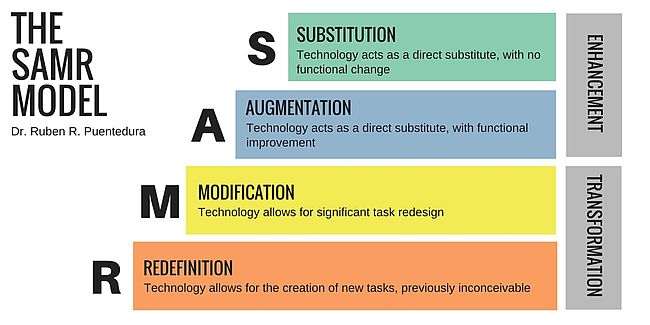
SAMR is a model designed to help educators infuse technology into teaching and learning. Popularized by Dr. Ruben Puentedura, the model supports and enables teachers to design, develop, and infuse digital learning experiences that utilize technology.
“SAMR” is an acronym that stands for Substitution, Augmentation, Modification, and Redefinition. The SAMR model provides a technique for moving through degrees of technology adoption to find more meaningful uses of technology in teaching and move away from simply using “tech for tech’s sake”.

Image result for samr

BELOW is an example of how an educator integrates SAMR into their lesson.
Lesson: Art/Painting
Original Assignment: Drawing a picture using traditional brush, paint, paper. Of course, there is a a big difference between doing this “by hand” in the traditional manner and doing it digitally – digitally is by no means “better”, it is just different and opens up some interesting possibilities.
Substitution: Use a digital drawing/painting program (like MS Paint) to draw/paint a picture.
Augmentation: Use a tool that allows the creation of your masterpiece to be “played back” (like Educreations, for example).
Modification: Pull a background image to use as a “canvas” – you could even scan something hand drawn and use that.
Redefinition: Create Artwork Collaboratively using a Collaborative Online Whiteboard (like Twiddla or one of these other tools).

5E's Instructional Model
The 5Es are an instructional model encompassing the phases Engage, Explore, Explain, Elaborate, and Evaluate, steps which educators have traditionally taught students to move through in phases.


Image result for 5e instructional model
Engagement
  • The teacher or a curriculum task accesses the learners’ prior knowledge and helps them become engaged in a new concept through the use of short activities that promote curiosity and elicit prior knowledge. The activity should make connections between past and present learning experiences, expose prior conceptions, and organize students’ thinking toward the learning outcomes of current activities.

Exploration
  • Exploration experiences provide students with a common base of activities within which current concepts (i.e., misconceptions), processes, and skills are identified and conceptual change is facilitated. Learners may complete lab activities that help them use prior knowledge to generate new ideas, explore questions and possibilities, and design and conduct a preliminary investigation. 

Explanation
  • The explanation phase focuses students’ attention on a particular aspect of their engagement and exploration experiences and provides opportunities to demonstrate their conceptual understanding, process skills, or behaviors. This phase also provides opportunities for teachers to directly introduce a concept, process, or skill. Learners explain their understanding of the concept. An explanation from the teacher or the curriculum may guide them toward a deeper understanding, which is a critical part of this phase.

Elaboration
  • Teachers challenge and extend students’ conceptual understanding and skills. Through new experiences, the students develop deeper and broader understanding, more information, and adequate skills. Students apply their understanding of the concept by conducting additional activities. 

Evaluation 
  • The evaluation phase encourages students to assess their understanding and abilities and provides opportunities for teachers to evaluate student progress toward achieving the educational objectives.
Reference :  https://bscs.org/sites/default/files/_legacy/BSCS_5E_Instructional_Model-Full_Report.pdf


ADDIE
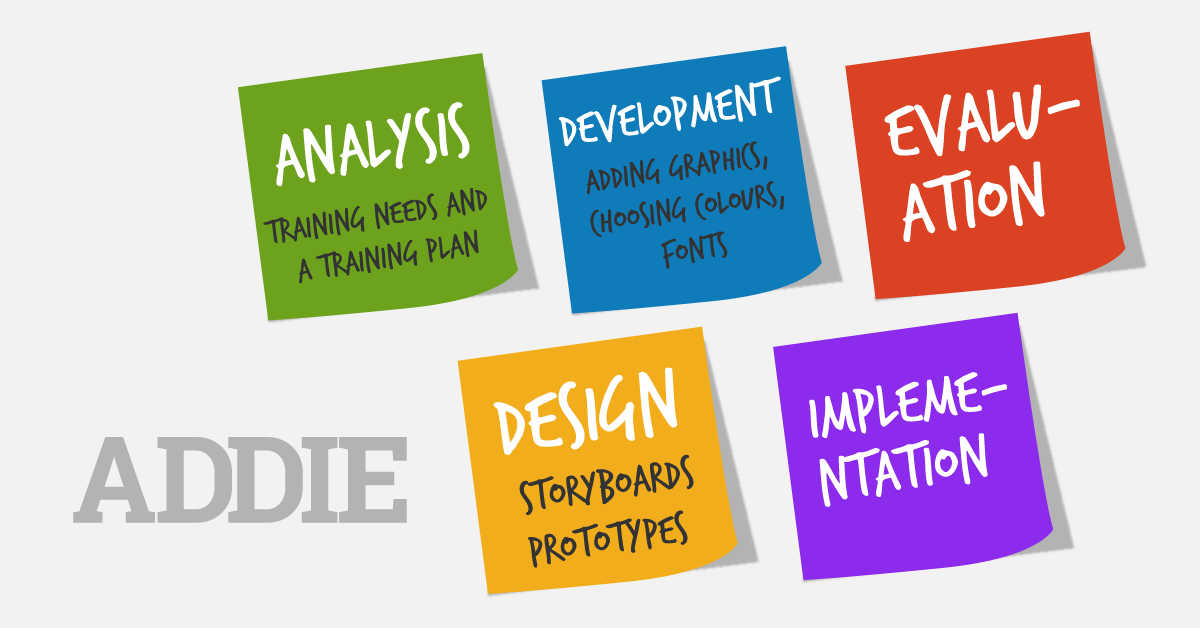
Addie is an acronym for the five stages of a development process: Analysis, Design, Development, Implementation, and Evaluation. The ADDIE model relies on each stage being done in the given order but with a focus on reflection and iteration.
Related image

Analysis Phase

  • In the analysis phase, instructional problem is clarified, the instructional goals and objectives are established and the learning environment and learner’s existing knowledge and skills are identified. Below are some of the questions that are addressed during the analysis phase:

Design Phase
  • The design phase deals with learning objectives, assessment instruments, exercises, content, subject matter analysis, lesson planning and media selection. The design phase should be systematic and specific. Systematic means a logical, orderly method of identifying, developing and evaluating a set of planned strategies targeted for attaining the project’s goals. Specific means each element of the instructional design plan needs to be executed with attention to details.

Development Phase
  • The development phase is where the developers create and assemble the content assets that were created in the design phase. Programmers work to develop and/or integrate technologies. Testers perform debugging procedures. The project is reviewed and revised according to any feedback given.

Implementation Phase
  • During the implementation phase, a procedure for training the facilitators and the learners is developed. The facilitators’ training should cover the course curriculum, learning outcomes, method of delivery, and testing procedures. Preparation of the learners include training them on new tools (software or hardware), student registration.
  • This is also the phase where the project manager ensures that the books, hands on equipment, tools, CD-ROMs and software are in place, and that the learning application or Web site is functional.

Evaluation Phase
  • The evaluation phase consists of two parts: formative and summative. Formative evaluation is present in each stage of the ADDIE process. Summative evaluation consists of tests designed for domain specific criterion-related referenced items and providing opportunities for feedback from the users.
ref : https://www.instructionaldesign.org/models/addie/

Saturday, December 8, 2018

ONLINE MODULE #3


MODULE #2 (BED) : CLASSROOM TECHNOLOGY TOOLS & TRENDS - Educational Technology

MODULE #2 (BED) : CLASSROOM TECHNOLOGY TOOLS & TRENDS

What is Classroom Technology?
Technology integration is the use of technology resources -- computers, mobile devices like smartphones and tablets, digital cameras, social media platforms and networks, software applications, the Internet, etc. -- in daily classroom practices, and in the management of a school.

When technology integration is at its best, a child or a teacher doesn't stop to think that he or she is using a technology tool -- it is second nature. And students are often more actively engaged in projects when technology tools are a seamless part of the learning process.


21ST C TOOL : INTERACTIVE WHITEBOARD: 21ST C TOOL : INTERACTIVE WHITEBOARD

An interactive whiteboard (IWB) is a large interactive display in the form factor of a whiteboard. It can either be a standalone touchscreen computer used independently to perform tasks and operations, or a connectable apparatus used as a touch pad to control computers from a projector. They are used in a variety of settings, including classrooms at all levels of education, in corporate board rooms and work groups, in training rooms for professional sports coaching, in broadcasting studios, and others.

Related image
https://www.bhphotovideo.com/images/images1000x1000/QOMO_HiteVision_QWB100_WS_PS_H_Interactive_Whiteboard_886349.jpg


An interactive whiteboard (IWB) device can either be a standalone computer or a large, functioning touchpad for computers to use.
A device driver is usually installed on the attached computer so that the interactive whiteboard can act as a Human Input Device (HID), like a mouse. The computer's video output is connected to a digital projector so that images may be projected on the interactive whiteboard surface.
The user then calibrates the whiteboard image by matching the position of the projected image in reference to the whiteboard using a pointer as necessary. After this, the pointer or other device may be used to activate programs, buttons and menus from the whiteboard itself, just as one would ordinarily do with a mouse. If text input is required, user can invoke an on-screen keyboard or, if the whiteboard software provides for this, utilize handwriting recognition. This makes it unnecessary to go to the computer keyboard to enter text.
Thus, an IWB emulates both a mouse and a keyboard. The user can conduct a presentation or a class almost exclusively from the whiteboard.
In addition, most IWBs are supplied with software that provides tools and features specifically designed to maximize interaction opportunities. These generally include the ability to create virtual versions of paper flipcharts, pen and highlighter options, and possibly even virtual rulers, protractors, and compasses—instruments that would be used in traditional classroom teaching.

Uses for interactive whiteboards may include:
  • Running software that is loaded onto the connected PC, such as a web browsers or other software used in the classroom.
  • Capturing and saving notes written on a whiteboard to the connected PC
  • Capturing notes written on a graphics tablet connected to the whiteboard
  • Controlling the PC from the white board using click and drag, markup which annotates a program or presentation
  • Using OCR software to translate cursive writing on a graphics tablet into text
  • Using an Audience Response System so that presenters can poll a classroom audience or conduct quizzes, capturing feedback onto the whiteboard
Reference :  Poulter, Tony. "Interactive Whiteboards: Research". Interactive Whiteboards. Archived from the original on 31 July 2012. Retrieved 31 July 2012.


VISUALIZATION TECHNOLOGY : VIRTUAL REALITY

The definition of virtual reality comes, naturally, from the definitions for both ‘virtual’ and ‘reality’. The definition of ‘virtual’ is near and reality is what we experience as human beings. So the term ‘virtual reality’ basically means ‘near-reality’. This could, of course, mean anything but it usually refers to a specific type of reality emulation.


In technical terms…
Virtual reality is the term used to describe a three-dimensional, computer generated environment which can be explored and interacted with by a person. That person becomes part of this virtual world or is immersed within this environment and whilst there, is able to manipulate objects or perform a series of actions.

ref : https://www.vrs.org.uk/virtual-reality/what-is-virtual-reality.html

It is hardly news that the way we teach our kids in schools is going through a digital revolution. What is new however, are the tools teachers now have access to, and how easy it can be to implement VR creation as a part of the class curriculum, in ways that support the study material being taught.

The concept to use VR as an educational tool has been gaining success amongst teachers and students, who apply the medium to a wide range of activities and in a variety of subjects.

Benefits Of Using Virtual Reality In The Classroom :
  • VR Can Stop Classroom Smartphone Distraction
  • Eliminates Language Barriers
  • Outstanding Visualizations
  • Social Integration of Students
Reference : https://readwrite.com/2018/03/20/benefits-using-virtual-reality-classroom/

DIGITAL STRATEGIES  : BYOD

In education BYOD/Bring Your Own Device (or BYOT/ Bring Your Own Technology) is commonly used to mean permitting students and/or staff to bring personally owned mobile devices (laptops, netbooks, tablets, smartphones, etc.) into educational institutions and to use those devices to access institutional information, applications and services
Related image

Ref : 

The Benefits of BYOD In The Classroom

  • Student participation increases.
  • Learning becomes student-driven.
  • Student collaboration and communication increases.
  • Personalized instruction.
  • Cost Savings.
  • Personalized instruction.

Although it offers some amazing benefits, BYOD comes with its cons. Here’s a sneak peek at the possible problems that this policy might lead to:

  • How To Reduce The Distraction?
That’s one of the most important questions to ask as a teacher who is looking to introduce BYOD in the classroom. The electronic devices can be used to perform so many things; no wonder they can be distracting. And, as a teacher, that’s not something you would like to happen in your class. Even if several websites are blocked, students who are quite tech savvy might be able to unblock them and visit them if they wish.
  • Security: A Major Issue.
Are the networks of the institutions properly secured? That’s a major question which is going to pop up if BYOD is allowed, as BYOD poses a few security issues. Moving too much data in the BYOD area can result in its theft. This is primarily an issue in offices and commercial organizations; however, it is also important to undertake the necessary steps to ensure safety while implementing BYOD in the educational institutions.

ref : https://elearningindustry.com/using-byod-schools-advantages-disadvantages

 INTERNET TECHNOLOGY : CLOUD COMPUTING
Cloud computing is a general term for the delivery of hosted services over the internet.
Cloud computing enables companies to consume a compute resource, such as a virtual machine (VM), storage or an application, as a utility -- just like electricity -- rather than having to build and maintain computing infrastructures in house.

Importance of Cloud Computing In Education Sector


  • Diminished Costs: Cloud-based administrations can help institutes decrease costs and quicken the utilization of new innovations to meet developing educational needs. Students can utilize office applications without purchasing, install and stay up with the latest on their PCs. It likewise gives the instructors of Pay per use for a few applications.
  • Easy Access: Lesson arranges labs, grades, notes, and PowerPoint slides – pretty much anything computerized that you use in training is effectively transferred.
  • Security: Your information, content, data, pictures – anything you store in the cloud normally requires verification (ID and secret word, for instance) – so it is not effectively available for anybody.
  • Share-ability: Cloud computing opens up a universe of new conceivable outcomes for students, particularly the individuals who are not served well by customary training frameworks.  With cloud computing, one can reach more and more diverse, students.


Ref : https://www.esds.co.in/blog/importance-of-cloud-computing-in-education-sector/#sthash.KCKWkGgE.dpbs


 21ST C TREND : OER - OPEN EDUCATIONAL RESOURCES


Often cited is the William and Flora Hewlett Foundation term which defines OER as:

teaching, learning, and research resources that reside in the public domain or have been released under an intellectual property license that permits their free use and re-purposing by others. Open educational resources include full courses, course materials, modules, textbooks, streaming videos, tests, software, and any other tools, materials, or techniques used to support access to knowledge.
ref : "2012 Paris OER Declaration". www.unesco.org. Retrieved 2017-12-05


Benefit of OER ;

Educators:

  • Can use affordable (mostly free) learning resources;
  • Can have updated content;
  • Are able to translate resources into other languages;
  • Can broaden access to learning, 
  • Publicly funded resources are available to the public

Learners can benefit from:

  • enhanced quality and flexibility of resources;
  • Seeing/applying knowledge in a wider context than their course would otherwise allow;
  • freedom of access and enhanced opportunities for learning;
  • support for learner-centred, self-directed, peer-to-peer and social/informal learning approaches;
  • authentic or 'real-life' learning experiences through OER that link to employer or professional sector activities, and so forth.
ref : http://www.teaching-learning.utas.edu.au/content-and-resources/open-educational-resources/benefits-of-open-educational-practices-and-resources

Conclusion :
    Technology has the ability to enhance relationships between teachers and students. When teachers effectively integrate technology into subject areas, teachers grow into roles of adviser, content expert, and coach. Technology helps make teaching and learning more meaningful and fun
    More and more studies show that technology integration in the curriculum improves students' learning processes and outcomes. Teachers who recognize computers as problem-solving tools change the way they teach. ... Another reason for technology integration is the necessity of today's students to have 21st century skills.


Sunday, December 2, 2018

Course Title and Code : Educational Technology (ESEB3073) 

MODULE #1 : STE(A)M LEARNING


 STEAM LEARNING
 What is STEAM learning? 
 " STEAM is an educational approach to learning that uses Science, Technology, Engineering, the Arts and Mathematics as access points for guiding student inquiry, dialogue and critical thinking."
 -Sun Riley, Arts Integration Specialist-

  •  STEAM-based programmes take an integrated approach to learning and teaching, which requires an intentional connection between curriculum learning objectives, standards, assessments, and lesson design/implementation. 
  • STEAM learning applies meaningful maths, science, and technology content to solve real-world problems through hands-on learning activities and creative design. Reference : http://elearning.tki.org.nz/Teaching/Future-focused-learning/STEAM There are two types of learning styles under STEAM Learning which are short term learning and medium term learning. Short Term Online Learning 
  •  According to the US Department of Education (2009)-Online learning is defined as a learning session that is conducted totally online as a substitute or alternative to face-to-face learning. 
The important benefit of online learning is that it can span time and distance. You do not have to be in the same place as your teacher to obtain course-related information. Even if you are attending a traditional course, when the instructor uses Skype for example, you can have anywhere, anytime access to your course documents along with consistent interaction with your classmates and teacher as long as you have ample internet connection.


 Mobile Learning 

  • Mobile learning, also known as m-learning, is an educational system. Mobile learning supports, with the help of mobile devices, a continuous access to the learning process. This can be on appliances like your phone, laptop or tablet. You can learn wherever and whenever you want. With the advent of mobile learning, educational systems are changing. 
  •  Advantages of mobile learning : . Videos make it possible to make learning more lively! -Working together from long distance While the one student might be in one place and the other one is in another place, it’s still possible to work together. This is one of the main benefits of mobile learning.
  • Disadvantages of mobile learning: - Distraction Mobile devices can be a great distraction for participants. Children like learning on tablets, but gaming on tablets seems to be even more fun! As a teacher you are not always able to control what your pupils are doing on their tablets. -Not enough electricity for all mobile devices There have to be enough sockets for all those mobile devices, and not even spoken about all the cables. This may be a problem in the first couple of years.
 Ref : https://www.easy-lms.com/knowledge-center/lms-knowledge-center/mobile-learning/item10388

 Adaptive Learning Technologies 

  •  Adaptive learning, also known as adaptive teaching, is an educational method which uses computer algorithms to orchestrate the interaction with the learner and deliver customized resources and learning activities to address the unique needs of each learner. 
  • Benefits of Using Adaptive Tech in Online Learning : -Students get real-time response to their work. -Teachers get data with insights into student needs. -It decreases the risk of students falling behind and giving up. -It can make the already minimal interactions between faculty and online students more productive. -The technology actively uses research about how people learn. 
  • A big part of what appeals to students about the possibility of online learning is being able to approach the material on their own time, at their own pace. Adaptive learning technology helps online students make sure they use their learning time as efficiently and productively as possible. Students still have to put in the work to succeed; but with adaptive technology, they’ll be able to focus on the right work.
  •  Ref :http://www.edudemic.com/how-adaptive-learning-technology-is-being-used-in-online-courses/
Medium Term
Immersive Learning

  • Immersive learning is the process of learning with the usage of a simulated or artificial environment. The environment enables the learners to completely get immersed in the learning and in a way that feels like experiencing an actual learning environment. This type of learning is becoming common with regards to online courses and learning. 
  • The Advantages of Immersive Learning : -Immersive learning enables you to practice the skills of the real world but in a safe environment. The activities are backed up with rich feedback and they do not disrupt or impact the real customers or processes in any way. 
  • Immersive learning provides a great platform and chance to practice interactions and skills wherever and whenever a learner has an access the eLearning platform. 
  • Immersive learning establishes a great platform and ability to let the geographically dispersed learners meet together to role-play and in a virtually established environment. With that, they can also have discussion and exchange knowledge and information – something that is more suitable for virtual worlds.
  • Examples of immersive learning through gaming : In the Assassin's Creed gaming series produced by Ubisoft, players get the opportunity to play as an assassin in various historical timelines. In Assassin's Creed Origins, we can view and immerse ourselves in Ancient Egypt during Cleopatra's rule. The gaming company had came up with the Discovery Tour version of AC : Origins whereby anyone can tour, view and learn about the history of ancient egypt. Added with graphics of where the historical events took place, educators can use the Discovery tour as an effective teaching tool whereby the students can immerse themselves in their topics.  
 Ref : https://raccoongang.com/blog/immersive-learning-explained/


 3D Printing 

  • 3D printing or additive manufacturing is a process of making three dimensional solid objects from a digital file.
  • 3D printing enables you to produce complex (functional) shapes using less material than traditional manufacturing methods.

Ways 3D Printing can be used in education : 
  1. Engineering design students can print out prototypes 
  2. Architecture students can print out 3D models of designs 
  3.  History classes can print out historical artifacts for examination 
  4.  Graphic Design students can print out 3D versions of their artwork 
  5. Geography students can print out topography, demographic, or population maps 
  6. Cooking students can create molds for food products 
  7.  Automotive students can print out replacement parts or modified examples of existing parts for testing


Conclusion
Overall, STEAM learning has provided both students and educators the opportunity to fully interact with their lessons and other related topics. The platform to immerse themselves into the virtual world of what their subject may be about would increase the understanding of the students towards what they are being taught and thus improving their ability to remember their lesson.

ONLINE MODULE #5 COLLABORATION TOOLS & COMMUNICATION TOOLS BLOGSPOT Blogger is a blog-publishing service that allows multi...